
Import Vimeo Showcases into WordPress Automatically
Import Vimeo showcases into WordPress automatically and turn curated video collections into structured content.
Vimeotheque helps you sync, organize and display Vimeo showcases without manual embedding.
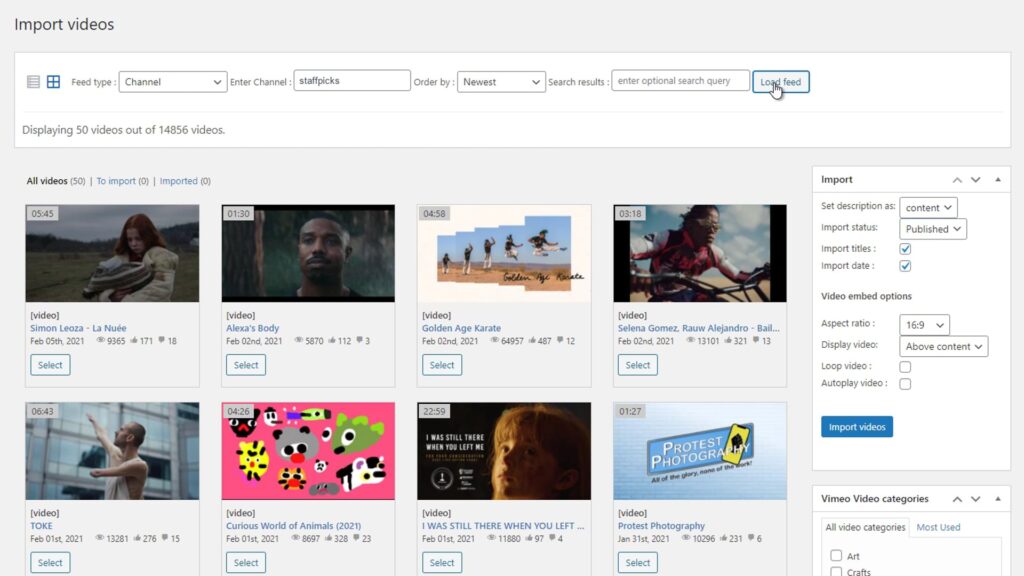
What Is a Vimeo Showcase?
Unlike folders or portfolios, showcases are often used to present videos publicly or share selected content in a structured format.
Vimeo showcases are often used to present selected videos in a specific order, making them ideal for portfolios, curated content and public video collections. Unlike simple embeds, showcases provide structure — but require additional tools to integrate properly into WordPress.
Embedding Vimeo Showcases in WordPress Is Limited
Embedding Vimeo showcases in WordPress only displays a player and does not integrate videos into your content system.
This means you cannot manage videos as posts, optimize them for SEO or build scalable video structures.
- No structured posts
- No SEO value per video
- No content control
- Hard to scale
Automatically Import Vimeo Showcases into WordPress
- Import full Vimeo showcases
- Keep showcase structure
- Sync content automatically
- Build scalable video websites
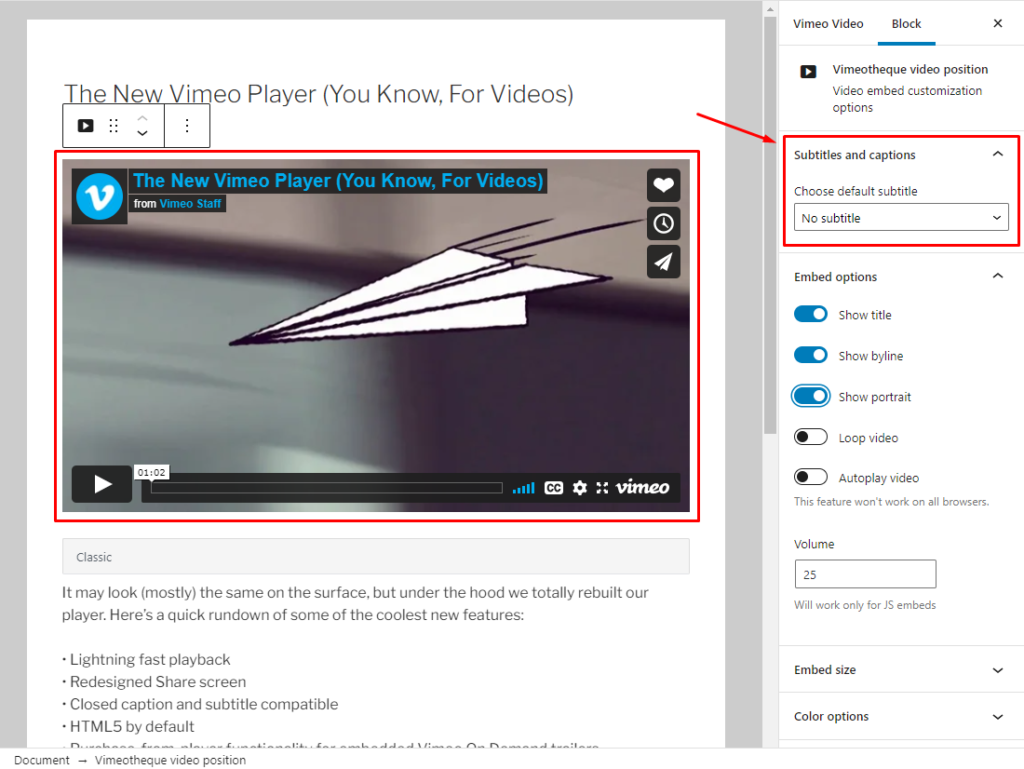
Turn Vimeo Showcases into SEO-Friendly WordPress Content
How it works
Simple 3-step process
Connect your Vimeo account
Select Vimeo showcases to import
Choose the Vimeo showcase that you want to import directly into your WordPress site.
Import and publish automatically
Entire showcases are imported and videos are automatically imported as WordPress posts with thumbnails, metadata and categories.
* No technical setup required. Works with any WordPress theme.
Embedding Vimeo Showcases vs Using a WordPress Plugin
Manual showcase embed
- Copy and paste embed codes
- No automation or workflow
- No synchronization with Vimeo
- Impossible to scale for large sites
Using Vimeotheque for showcases
- Import videos automatically
- Sync content with Vimeo
- Import full metadata and thumbnails
- Built for scalable video websites
Vimeo Showcase WordPress Integration – FAQs
What is a Vimeo showcase?
A Vimeo showcase is a curated collection of videos organized in a specific order within your Vimeo account.
It allows you to group selected videos together and present them as a structured collection, often used for public sharing or content presentation.
Unlike folders or portfolios, showcases are typically designed for display and sharing, making them ideal for video galleries or curated content pages.
Can I import a Vimeo showcase into WordPress?
Yes, you can import a Vimeo showcase into WordPress using a plugin like Vimeotheque.
Instead of embedding a single showcase player, the plugin imports all videos from the showcase and converts them into WordPress posts, including titles, thumbnails and metadata.
This allows you to fully control how the content is displayed and organized on your website.
How is importing a Vimeo showcase different from embedding it?
Embedding a Vimeo showcase only displays a video player on your website, without integrating the videos into your WordPress content system.
Importing a showcase, on the other hand, creates individual WordPress posts for each video. This gives you:
- Better SEO visibility
- Full control over layout and design
- The ability to organize videos using categories and taxonomies
- A scalable content structure
Can I automatically sync Vimeo showcases with WordPress?
Yes. With Vimeotheque, you can automatically sync your Vimeo showcases with WordPress.
This means:
- New videos added to the showcase can be imported automatically
- Existing videos can be updated with new metadata
- Your website stays in sync with your Vimeo content without manual work
What is the difference between Vimeo showcases, folders and portfolios?
Vimeo provides several types of collections:
- Showcases – curated collections designed for presentation and sharing
- Folders – used for organizing videos internally inside your Vimeo account
- Portfolios – structured collections often used for showcasing work
All of these can be imported into WordPress, but showcases are typically used for public-facing video galleries.
Can I display imported Vimeo showcases as video galleries?
Yes. Once imported, videos from a Vimeo showcase can be displayed as:
- Video grids
- Playlists
- Series
- Custom video galleries
Because each video becomes a WordPress post, you can use your theme, Elementor or other builders to design the layout exactly as you want.
Is importing Vimeo showcases better for SEO than embedding?
Yes. Importing Vimeo showcases into WordPress significantly improves SEO compared to embedding.
Each video becomes its own page or post, which means:
- Search engines can index each video individually
- You can optimize titles, descriptions and URLs
- You create more content pages on your website
Embedding alone does not provide these benefits.
Do I need coding skills to import Vimeo showcases?
No. Importing Vimeo showcases with Vimeotheque requires no coding.
The plugin connects to your Vimeo account via API and allows you to import videos using a simple interface.
You can manage everything directly from WordPress.
Can I use Vimeo showcases for membership or restricted content?
Yes. You can import videos from Vimeo showcases and use them in membership or restricted areas of your website.
Once imported, videos can be controlled using WordPress membership plugins, allowing you to:
- Restrict access to specific users
- Create premium content areas
- Build subscription-based video platforms
How do I start importing Vimeo showcases into WordPress?
To start importing Vimeo showcases:
- Install the Vimeotheque plugin
- Connect your Vimeo account
- Select the showcase you want to import
- Import videos into WordPress
From there, you can organize and display your videos however you want.