
Import Vimeo Videos into WordPress Automatically
Vimeotheque is a powerful Vimeo WordPress plugin that automatically syncs your videos.
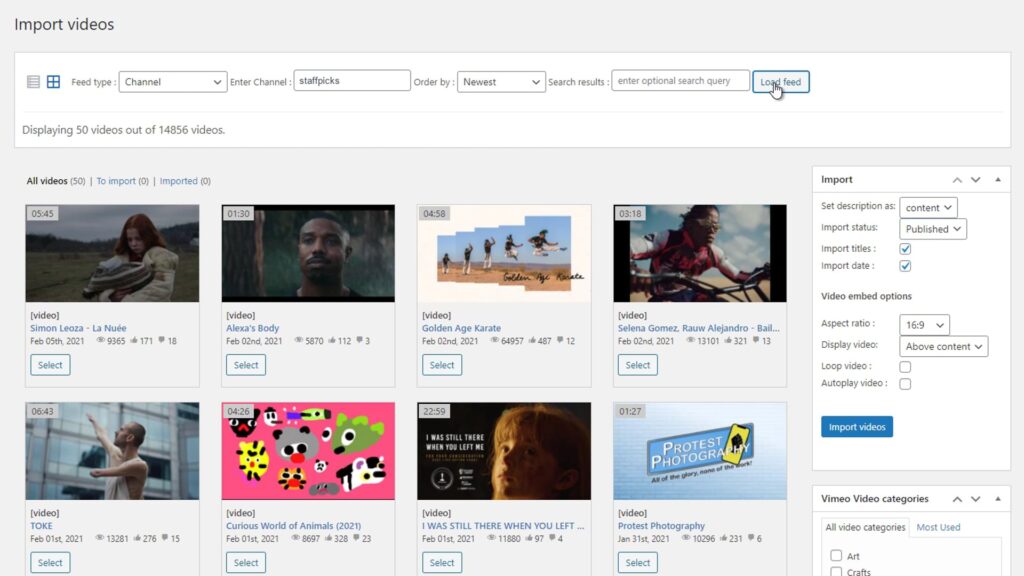
Automatically import Vimeo videos as WordPress posts with thumbnails, titles, descriptions and metadata.
Manually Adding Vimeo Videos to WordPress Is Slow
- No automation
- Manual embedding
- Hard to scale
Automatically Import Vimeo Videos into WordPress
Manually adding Vimeo videos to WordPress is slow and hard to maintain. Each video needs to be embedded, formatted and updated individually.
Vimeotheque automates the entire process by importing videos directly from Vimeo as WordPress posts, complete with thumbnails, titles, descriptions, tags and categories.
- Import videos as WordPress posts
- Automatically fetch thumbnails
- Sync channels and folders
- No manual embedding required
Import Vimeo Videos by Collection Type
How to Import Vimeo Videos into WordPress
Connect your Vimeo account
Select videos or collections
Import and publish automatically
* No technical setup required. Works with any WordPress theme.
Who Is This Vimeo WordPress Plugin For?
Vimeo membership websites
Vimeo online courses
Video content websites
Embedding Vimeo Videos vs Using a WordPress Plugin
Manual Vimeo embed
- Copy and paste embed codes
- No automation or workflow
- No synchronization with Vimeo
- Impossible to scale for large sites
Using Vimeotheque plugin
- Import videos automatically
- Sync content with Vimeo
- Import full metadata and thumbnails
- Built for scalable video websites
Frequently Asked Questions About Vimeo WordPress Plugins
What is a Vimeo WordPress plugin?
A Vimeo WordPress plugin allows you to import, manage and display Vimeo videos directly inside WordPress without manually embedding each video. It connects to the Vimeo API and automates video publishing, metadata import and synchronization.
How do I import Vimeo videos into WordPress automatically?
Can I sync Vimeo videos with WordPress?
Yes. Vimeotheque automatically syncs your Vimeo content with WordPress, ensuring that new videos, updates and metadata changes are reflected on your website without manual work.
Can I import Vimeo folders or showcases into WordPress?
Yes. Vimeotheque supports importing entire Vimeo collections, including folders, showcases and portfolios, allowing you to organize video content at scale inside WordPress.
Does this work with any WordPress theme?
Is manual Vimeo embedding bad for SEO?
Can I use Vimeo videos for membership or course websites?
Yes. Vimeotheque integrates with membership and LMS plugins, allowing you to control access to private Vimeo videos and build structured video courses.