
We’ve released version 1.0.5 of the Vimeo Me add-on for Vimeotheque PRO, bringing important fixes and a new import option designed to make bulk video management more flexible and predictable—especially for larger Vimeo libraries.
This update focuses on two key areas:
- reliability when browsing Vimeo resources, and
- finer control over how skipped videos are handled during bulk imports.
What the Vimeo Me Add-on Does
Vimeo Me extends Vimeotheque PRO with advanced import capabilities powered by a React-based admin interface. It allows you to:
- Query Vimeo folders, showcases, and portfolios
- Automatically load these resources on demand
- Import videos in bulk as WordPress posts
- Assign categories during import
If a video already exists as a WordPress post, it is skipped automatically to prevent duplicates—keeping your site clean and consistent.
Bug Fix: Full Resource Loading (No More 10-Item Limit)
In previous versions, both showcases and portfolios were limited to displaying only the first 10 items. This could give the impression that resources were incomplete or missing content.
What’s fixed in 1.0.5:
- Showcases now load all available videos
- Portfolios now load all available videos
- Pagination and API limits are handled correctly behind the scenes
If you work with large curated collections on Vimeo, this alone should make a noticeable difference.
New Import Option: Assign Categories to Skipped Videos
One of the most requested improvements is now available.
The Problem
When importing videos in bulk, any video that already existed in WordPress was skipped entirely—including category assignment. This was correct behavior from a data integrity standpoint, but limiting in real-world workflows.
The Solution
Version 1.0.5 introduces a new option:
Assign selected import categories to skipped videos as additional categories
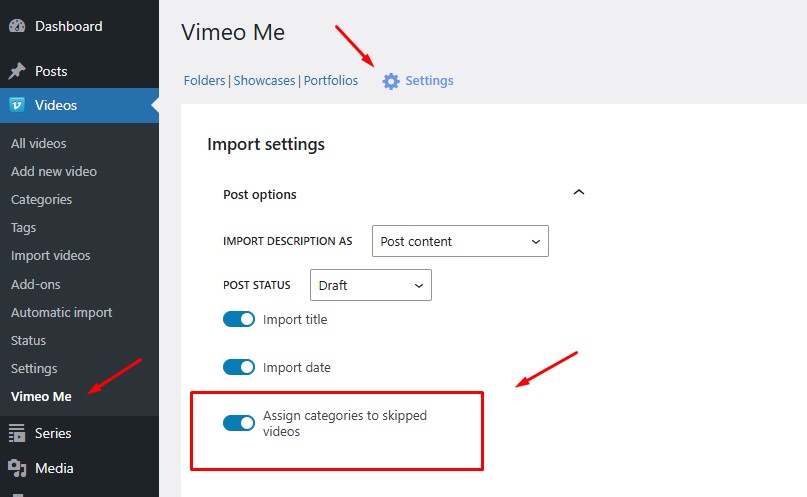
How It Works
- During bulk import, videos that already exist are still skipped (no duplicate posts)
- If this option is enabled, the categories selected for the import are added to the existing post
- Existing categories are preserved; nothing is overwritten
Default Behavior
- The option defaults to the global setting in:
Vimeotheque → Settings → After Import → Assign additional categories
- In Vimeo Me, the option is also exposed directly in the import interface
- You can enable or disable it per import, depending on your use case
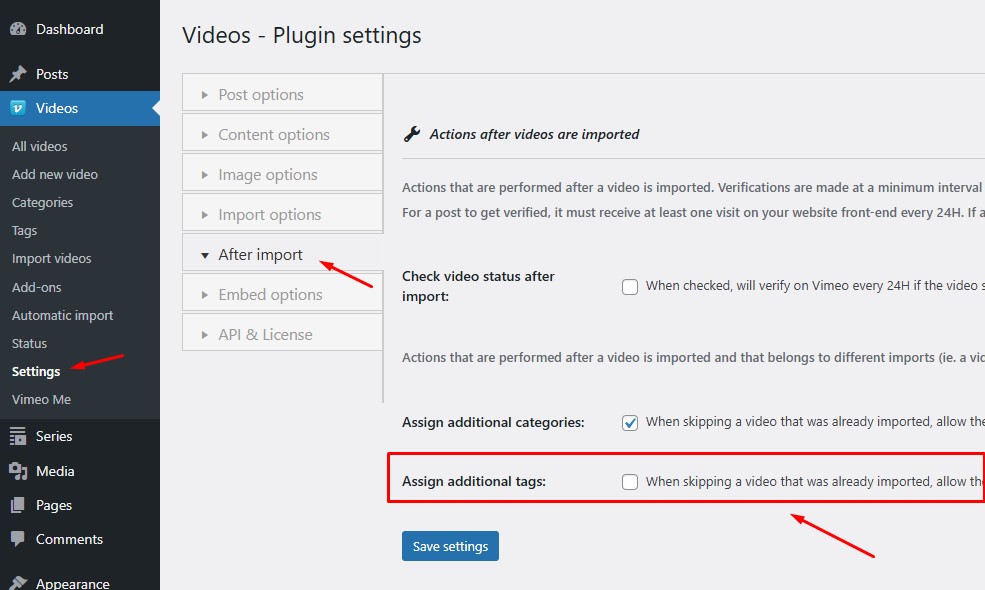
This makes it easy to reuse Vimeo resources across different sections of your site without re-importing or manually editing posts.
Where to Update
You can update Vimeo Me for Vimeotheque PRO to version 1.0.5 in either of the following ways:
- WP Admin → Videos → Add-ons (Vimeotheque menu)
- WP Admin → Plugins (standard WordPress update flow)
As always, we recommend backing up your site before applying updates.
Why This Update Matters
Version 1.0.5 is a quality-of-life release aimed at users who:
- Manage large Vimeo libraries
- Rely on folders, showcases, or portfolios for content organization
- Use categories strategically across multiple imports
- Want predictable, non-destructive bulk operations
It keeps the core promise of Vimeo Me intact: fast, safe, and flexible Vimeo-to-WordPress imports, without surprises.
If you have feedback or ideas for future improvements, we’re listening.