
When Vimeo video thumbnails are missing on your WordPress site after import, it is almost always caused by an import setting, a media library permission issue, or a Vimeo API access restriction. This guide covers each cause and the fix so your Vimeotheque-powered video posts display their thumbnails correctly.
Why Vimeo Thumbnails Go Missing in WordPress
Thumbnail Import Was Not Enabled at Import Time
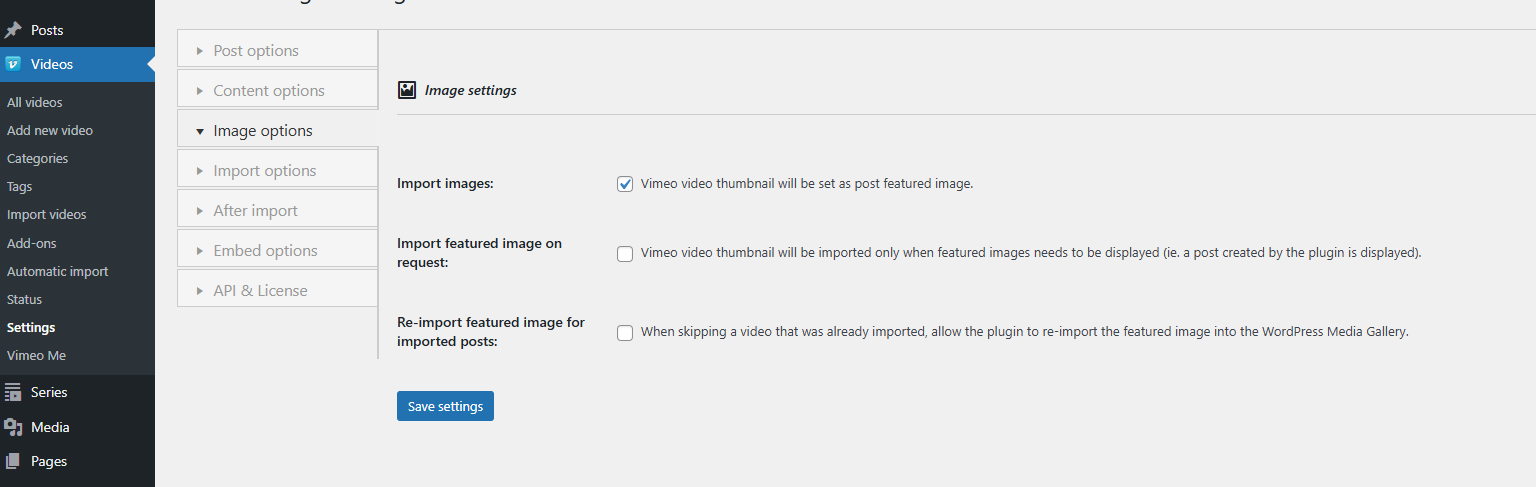
By default, Vimeotheque can import the Vimeo video thumbnail and set it as the WordPress featured image. However, this option must be enabled in the import settings before importing. If thumbnails were not enabled, the posts were created without featured images.
WordPress Media Library Write Permissions
Vimeotheque downloads the thumbnail file and saves it to your WordPress media library during import. If the wp-content/uploads directory is not writable by the web server, the download fails silently and no featured image is set. Check folder permissions via your hosting control panel or FTP client.
Vimeo Thumbnail URL Changed After Import
Vimeo periodically changes thumbnail CDN URLs. If an imported post stores a Vimeo CDN URL as the featured image source rather than a locally saved copy, the thumbnail will eventually return a 404. Reimporting forces Vimeotheque to download and store a fresh local copy.
API Access Restriction for Private Videos
Thumbnails for private Vimeo videos are only returned by the API if your OAuth token has the correct access level. Without authorization, the API response omits the thumbnail URL and the import proceeds without a featured image.
How to Fix Missing Thumbnails
Enable Thumbnail Import in Settings
Go to Vimeotheque → Settings → Import and confirm that the option to import the video thumbnail as a featured image is enabled. Save the settings.
Reimport the Affected Posts
Open each affected post in the WordPress post editor. Use the Vimeotheque meta box to trigger a video data reimport. This will fetch the current thumbnail from Vimeo, download it to the media library, and set it as the featured image. For bulk updates, use the Video Details Re-Import add-on available in Vimeotheque PRO.
Check Upload Directory Permissions
Verify that your wp-content/uploads folder and its subdirectories are writable. On Linux servers, the standard permission for this directory is 755 with ownership set to the web server user. Use your hosting file manager or FTP client to confirm.
Preventing Missing Thumbnails on Future Imports
Before running any import, verify that thumbnail import is enabled in the settings. When importing Vimeo videos into WordPress in bulk, test a single video first to confirm thumbnails are being saved to the media library before running the full batch.
Frequently Asked Questions
Can I import Vimeo thumbnails in bulk for posts that are already imported?
Yes. Use the Video Details Re-Import add-on in Vimeotheque PRO to bulk-reimport video data, including thumbnails, for multiple posts at once from the post list screen.
Will reimporting thumbnails replace thumbnails I have set manually in WordPress?
Yes. A full video data reimport will overwrite the featured image with the current Vimeo thumbnail. If you have set a custom thumbnail manually, do not use the full reimport option — edit the featured image directly in the post editor instead.
Why are thumbnails missing only for some videos?
Per-video privacy settings on Vimeo affect whether the thumbnail URL is returned by the API. Private or restricted videos may return no thumbnail unless your API token has the appropriate access permissions.
Does Vimeotheque store thumbnails locally or link directly from Vimeo?
Vimeotheque downloads the thumbnail from Vimeo and saves it to your WordPress media library as a local attachment. This means thumbnails remain available even if the Vimeo CDN URL changes.
Does the thumbnail import setting affect all future imports?
Yes. The thumbnail import setting applies globally to all subsequent imports. It does not retroactively add thumbnails to already-imported posts.